close
close
StockMusic.ir
  • کتابخانه استایل‌های تایپوگرافی برای افتر افکت

  • Text Styles AE v1.0.0

  • circle شرکت سازنده: AEscripts
  • circle کد محصول: 31892
  • circle نرم‌افزار سازگار: After Effects
  • circle نسخه نرم‌افزار: 2027, 2026, 2025, 2024 و بالاتر
  • circle فرمت فایل: ZIP

Text Styles AE به شما امکان می‌دهد در After Effects کتابخانه‌ای از استایل‌های تایپوگرافی بسازید و آن‌ها را با یک کلیک روی لایه‌های متنی اعمال کنید. هر استایل می‌تواند تنظیمات کامل متن، شامل ویژگی‌های کاراکتر، قالب‌بندی پاراگراف و برخی Layer Styleهای پشتیبانی‌شده مانند Drop Shadow و Outer Glow را ذخیره کند.

از فونت، اندازه و رنگ گرفته تا فاصلهٔ خطوط و حروف، تراز، تورفتگی، فاصله‌گذاری و خط‌تیره‌گذاری را ذخیره و دوباره اعمال کنید. با تغییر طراحی، استایل‌ها را به‌روزرسانی کنید و برای استفاده در پروژه‌های دیگر یا اشتراک‌گذاری با طراحان، خروجی بگیرید.

روش کار

۱- ساخت استایل

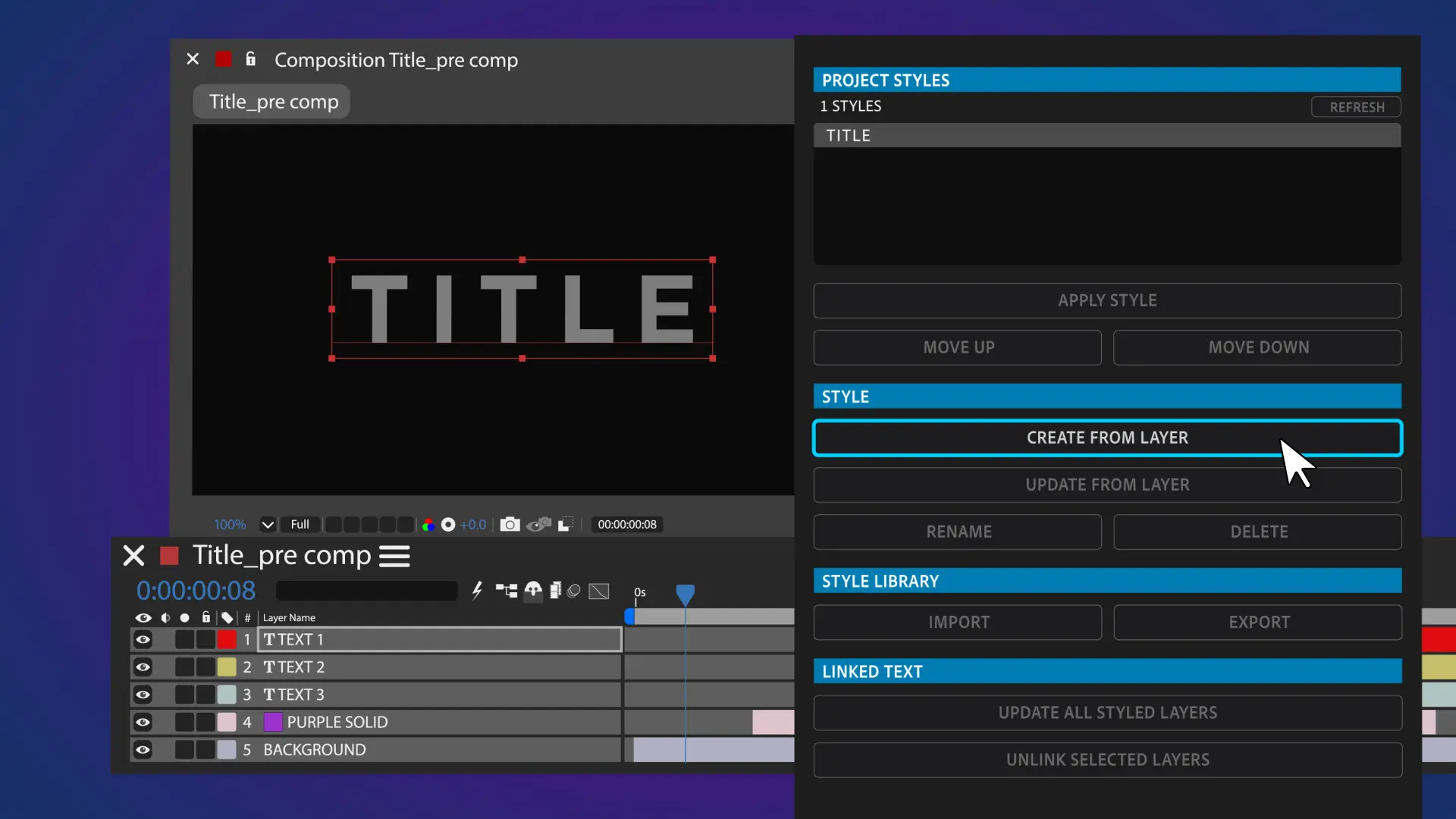
یک لایهٔ متنی را در کامپوزیشن انتخاب کنید و در پنل Text Styles AE روی Create From Layer کلیک کنید. برای استایل نامی انتخاب کنید تا در پنجرهٔ Project Styles نمایش داده شود. این کار را برای ساخت استایل‌های بیشتر تکرار کنید.

۲- اعمال استایل

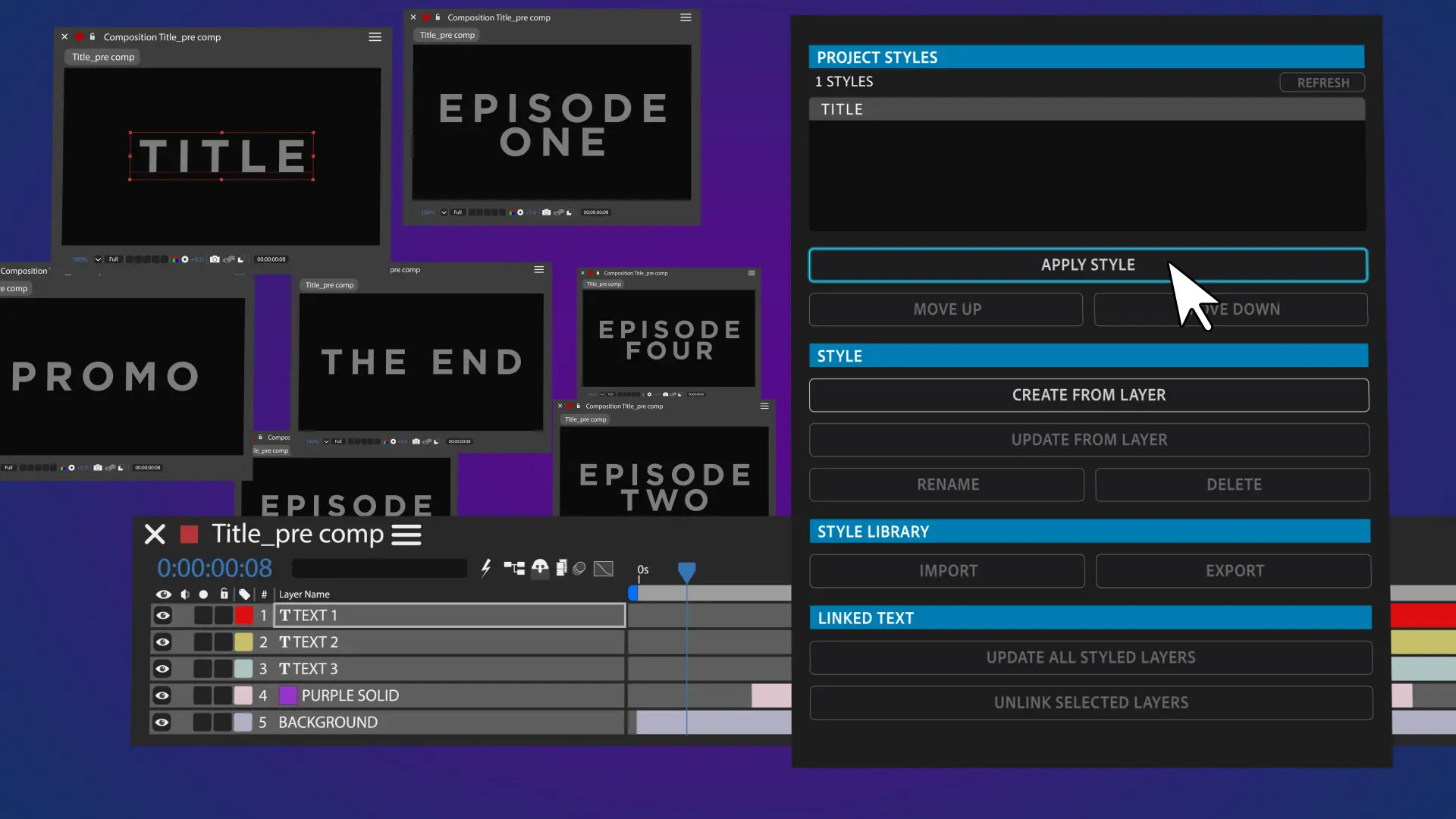
لایهٔ متنی موردنظر را انتخاب کنید، استایل را از پنجرهٔ Project Styles برگزینید و روی Apply Style کلیک کنید تا قالب‌بندی ذخیره‌شده روی متن اعمال شود.

۳- به‌روزرسانی استایل

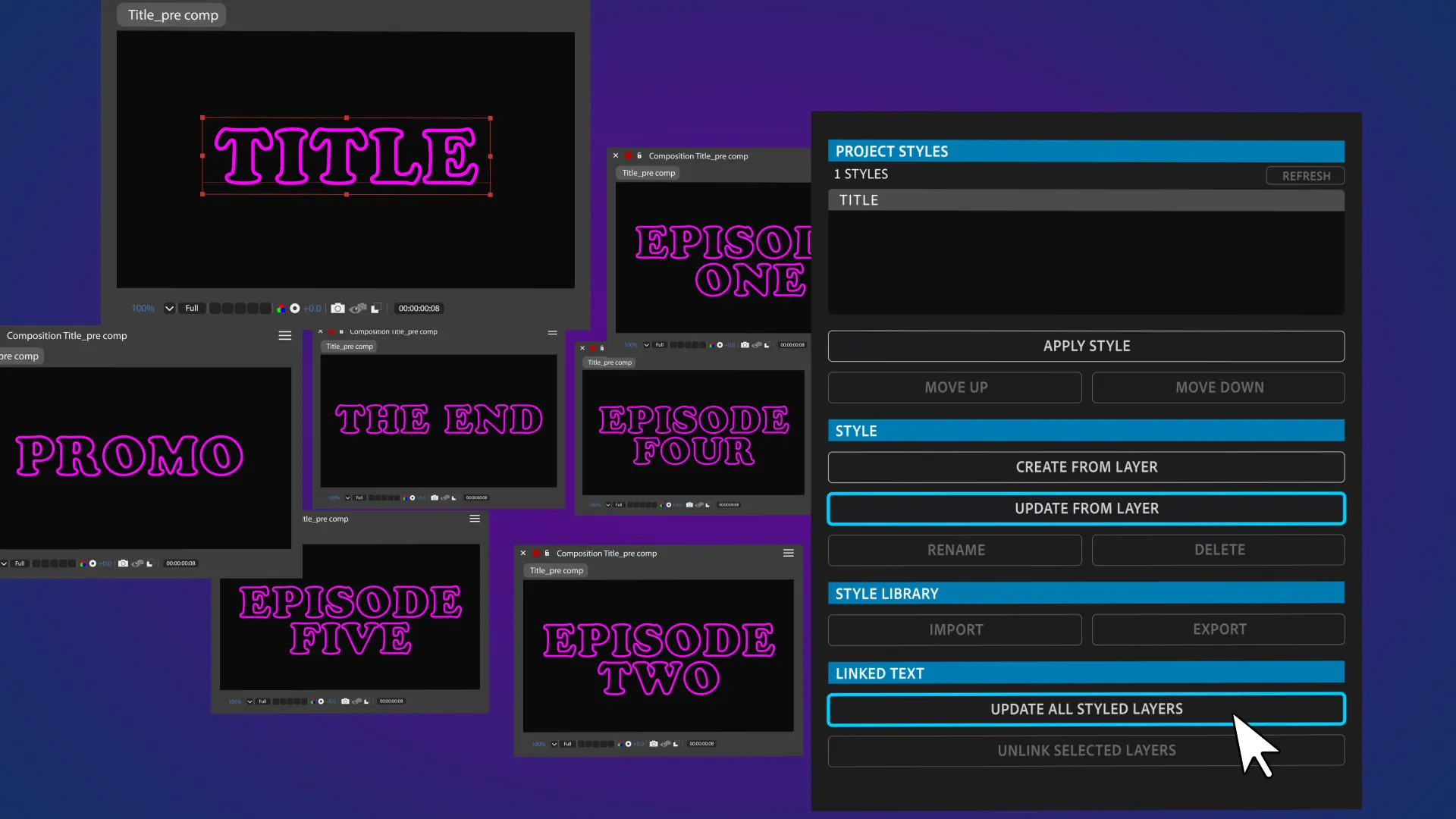
تغییرات طراحی را روی یک لایهٔ متنی که از آن استایل استفاده می‌کند انجام دهید؛ لازم نیست همان لایهٔ اولیه باشد. پس از کلیک روی Update From Layer، استایل ذخیره‌شده با تنظیمات جدید جایگزین می‌شود. سپس با انتخاب Update All Styled Text، همهٔ لایه‌های متنیِ دارای آن استایل در سراسر پروژه به‌روزرسانی می‌شوند.

توجه: با به‌روزرسانی استایل، نسخهٔ قبلی آن از بین می‌رود. اگر می‌خواهید نسخهٔ قبلی را نگه دارید، پیش از به‌روزرسانی همهٔ متن‌های دارای آن استایل، از یک لایهٔ به‌روزشده استایل جدیدی بسازید.

۴-  خروجی گرفتن و استفاده مجدد

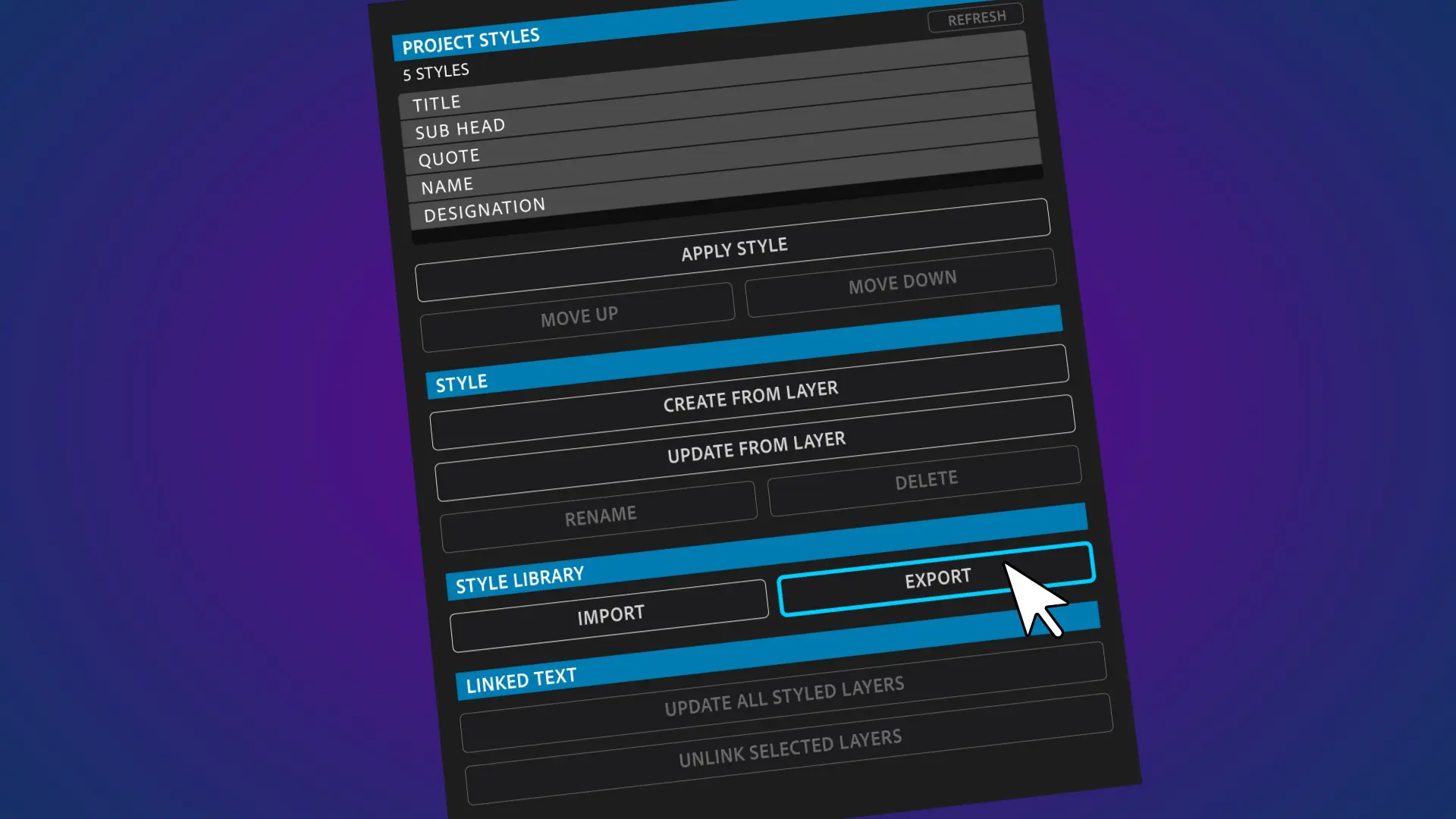
با گزینهٔ Export استایل‌ها را برای استفاده در پروژه‌ای دیگر یا اشتراک‌گذاری با طراحان ذخیره کنید. فایل خروجی با فرمت .json است و می‌توان آن را در پروژه‌ای دیگر با Text Styles AE وارد کرد.

به این پست چه امتیازی می دهید؟

0 / 5. 0

GraphicFarm.ir
  • sell کد محصول: 31892
  • folder_zipفرمت: RAR
  • saveحجم: 1 MB
  • linkمنبع

Create project-wide typography style libraries for After Effects, for faster formatting, consistent design, and effortless updates.

Description

Create a consistent typography system and apply styles to text in one click.
Save the complete design of your text in every Project Style, including Character settings, Paragraph formatting, and supported Layer Styles like Drop Shadow and Outer Glow.
Instantly reapply everything from font, size, color, leading, and tracking to alignment, indents, spacing, and hyphenation.
Update your Styles as the design changes and export for use in other projects and with other designers. 

Create
To create a new style, simply select any text layer in your After Effects composition and click 'Create From Layer' in the Text Styles AE panel. 
Give your style a name and it will automatically appear in the Project Styles window.
Select another text layer, click 'Create From Layer' again and repeat for as many styles as you want.

Apply your Style
Select any unformatted text layer, select a style from the Project Styles window and click 'Apply Style'. Your text will instantly be formatted to your saved style.

Update a Style
When your design changes, your Styles can change too. 
Make your design changes to a text layer which is already saved as a style. It doesn't have to be the original text the style was saved from, any text layer which uses that style will work. 
Once you're happy with the changes click 'Update From Layer' and the Style will be overwritten.
When you're happy that the new style is right, click 'Update All Styled Text' and Text Styles AE will update all the text layers with that Style across your entire After Effects project.
FYI: your original style will be lost, so if you liked it and wanted to keep it tucked away, select an updated layer and create a new style before pressing 'Update All Styled Text'!

Export and re-use
You can save your Styles to use on another project or to share with other designers by clicking on 'Export'. 
Your Styles will be saved as a .json file. These can easily be imported into another project using Text Styles AE.

00:00 - Introduction to Text Styles AE
00:04 - Creating your first Style
00:21 - Applying a Style
00:40 - Updating a Style
01:12 - Open a new project
01:28 - Open an existing Text Styles AE project
01:50 - Exporting Stylyes
01:58 - Summing up
02:06 - Outro

footagefarm.ir

ارسال دیدگاه

keyboard_arrow_up

ورود به حساب کاربری

بازیابی رمز عبور

یکی از روش‌های زیر را برای بازیابی رمز عبور انتخاب کنید