close
close
StockMusic.ir
  • اسکریپت افتر افکت برای افزایش یا کاهش زمان دسته جمعی کامپ‌ها

  • AEscripts - Retend v1.5.0 Win/Mac

  • circle شرکت سازنده: AEscripts
  • circle کد محصول: 36700
  • circle نرم‌افزار سازگار: After Effects
  • circle نسخه نرم‌افزار: 2027, 2026, 2025, 2024, 2023, 2022, 2021, 2020 و بالاتر
  • circle فرمت فایل: ZIP

Retend زمان‌بندی یا مدت‌زمان کل درخت کامپوزیشن‌های تو‌در‌تو را با یک کلیک تغییر می‌دهد. کافی است یک لایهٔ پیش‌کامپوزیشن را انتخاب کنید یا برای اعمال تغییر روی کل کامپوزیشن باز، چیزی انتخاب نکنید؛ سپس مدت‌زمان یا سرعت دلخواه را وارد کنید. همهٔ کامپوزیشن‌های تو‌در‌تو، در هر عمقی، هم‌زمان و درست تغییر می‌کنند.

چهار عملیات اصلی

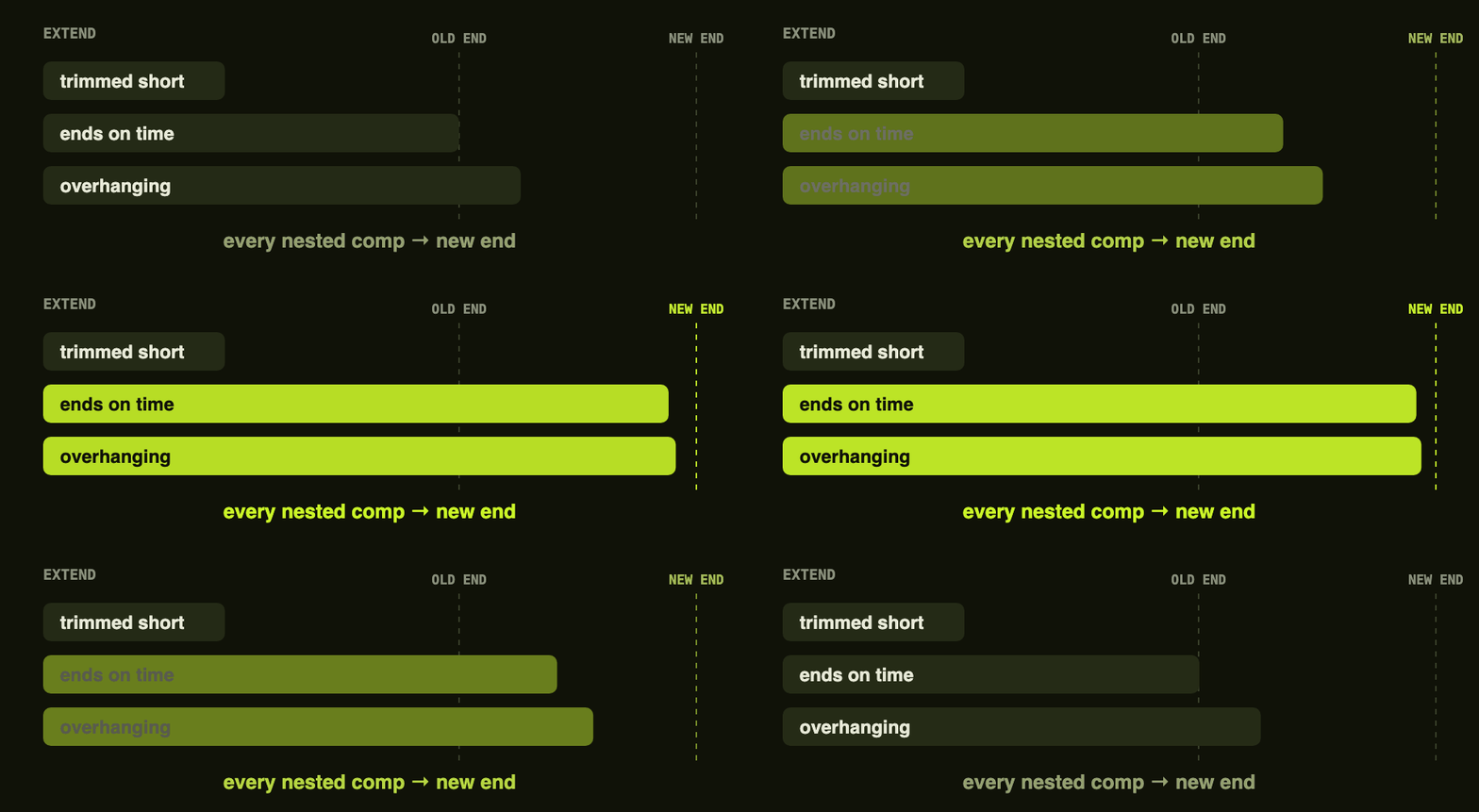
  • افزایش مدت‌زمان (Extend): مدت‌زمان کل درخت پیش‌کامپوزیشن را افزایش دهید، بدون اینکه کی‌فریمی تغییر کند. همهٔ کامپوزیشن‌های تو‌در‌تو، در تمام سطوح، به یک میزان طولانی‌تر می‌شوند. لایه‌هایی که تا انتهای قبلی کامپوزیشن امتداد دارند، به انتهای جدید کشیده می‌شوند؛ اما لایه‌هایی که عمداً کوتاه شده‌اند، در جای خود باقی می‌مانند. اگر فوتیج پیش از پایان زمان جدید تمام شود، آخرین فریم آن ثابت می‌ماند.

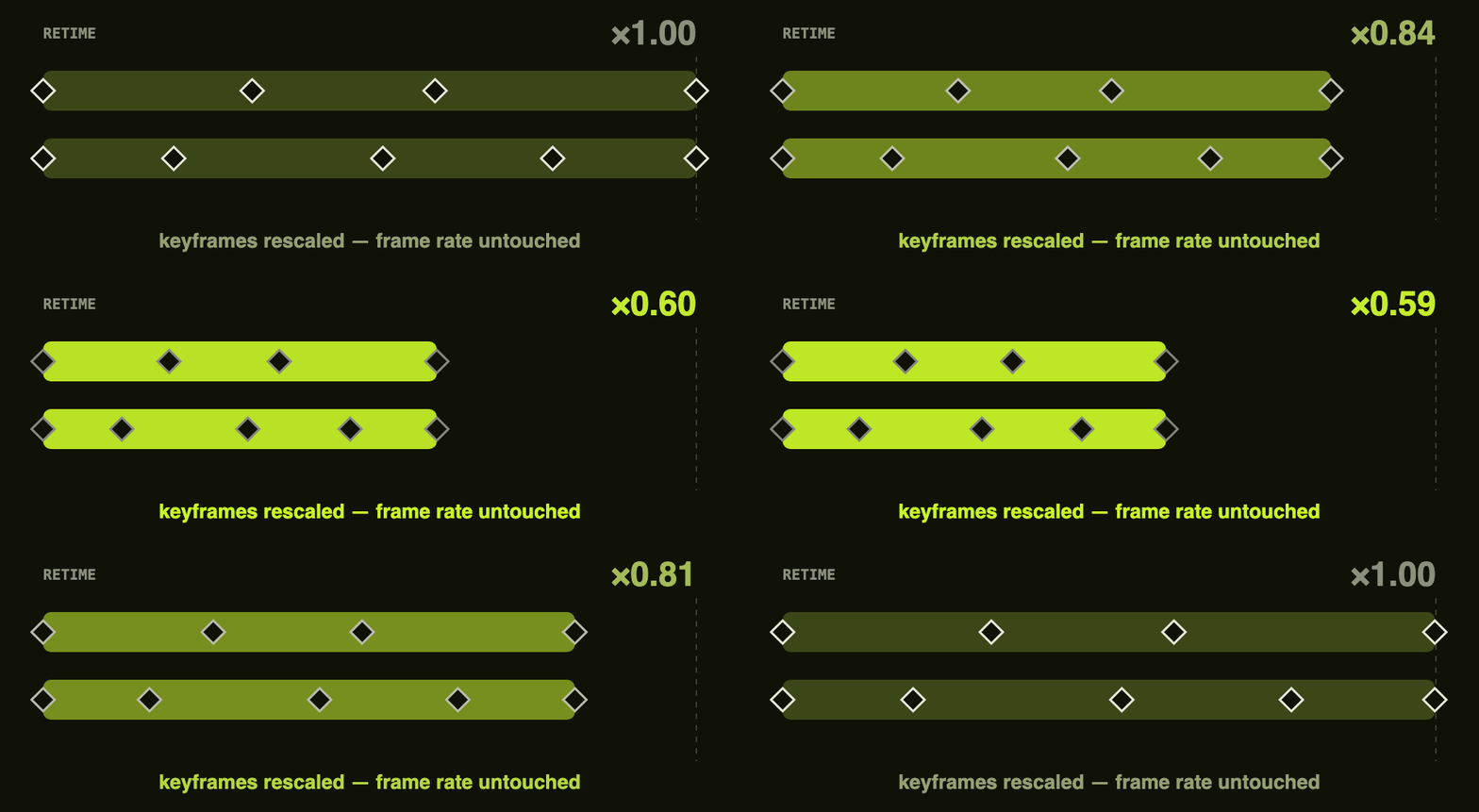
  • تغییر سرعت (Retime): کل درخت کامپوزیشن‌های تو‌در‌تو را به‌صورت متناسب سریع‌تر یا کندتر کنید. زمان‌بندی همهٔ کی‌فریم‌ها، مارکرها و لایه‌ها با هم تغییر می‌کند و حالت‌های Ease حفظ می‌شوند. نرخ فریم تغییر نمی‌کند و لایهٔ Time Remapping نیز اضافه نمی‌شود.

retime

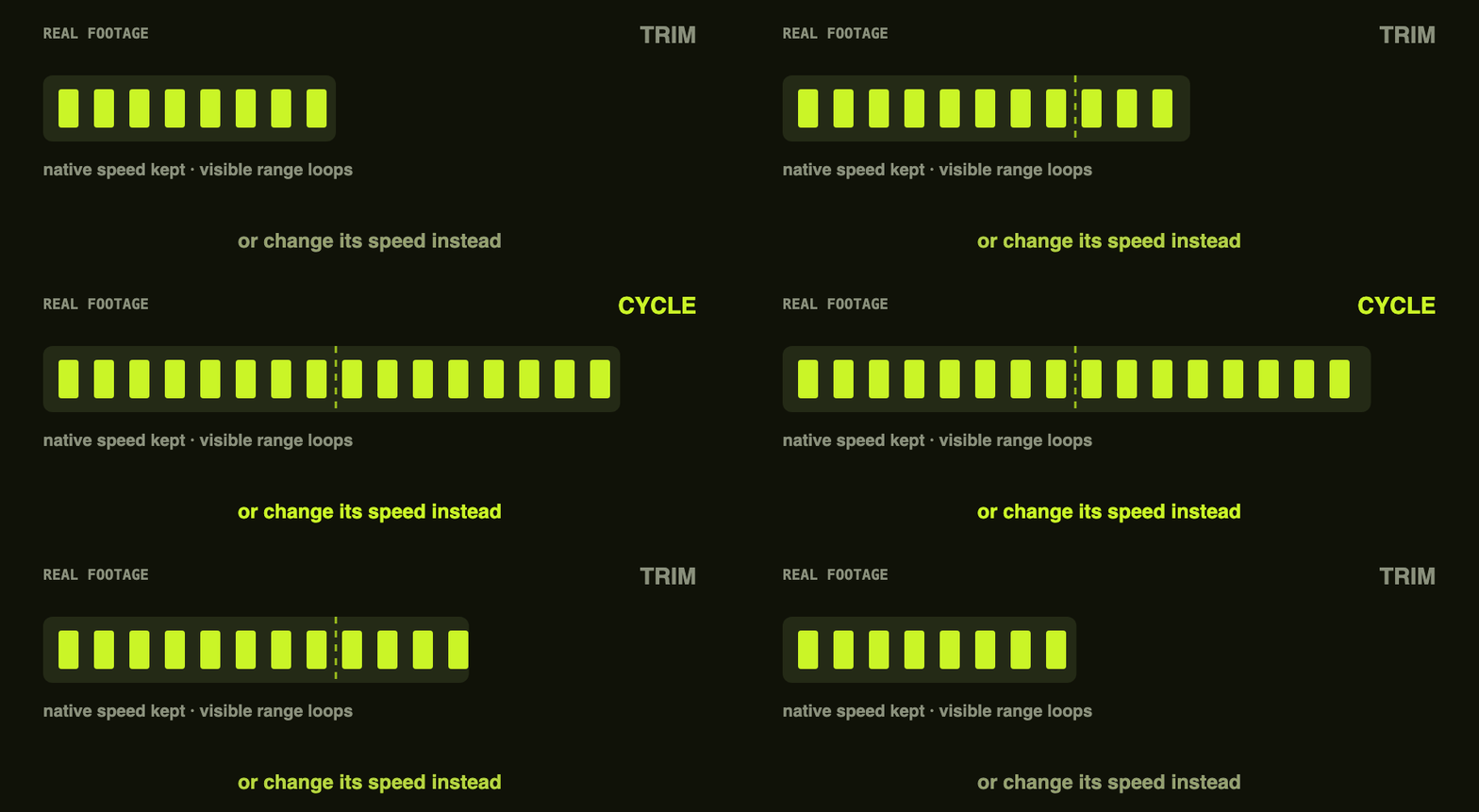
  • مدیریت فوتیج واقعی: از آنجا که ویدئو و صدا کی‌فریم ندارند، می‌توانید تعیین کنید هنگام تغییر زمان چه اتفاقی بیفتد: با تغییر سرعت، محتوا کشیده می‌شود تا سریع‌تر یا کندتر پخش شود؛ یا با حفظ سرعت اصلی، بخش انتهایی کوتاه می‌شود و در صورت افزایش زمان، محدودهٔ قابل‌مشاهده به‌شکل چرخه‌ای (Cycle) یا رفت‌وبرگشتی (Ping-pong) تکرار می‌شود.

footage

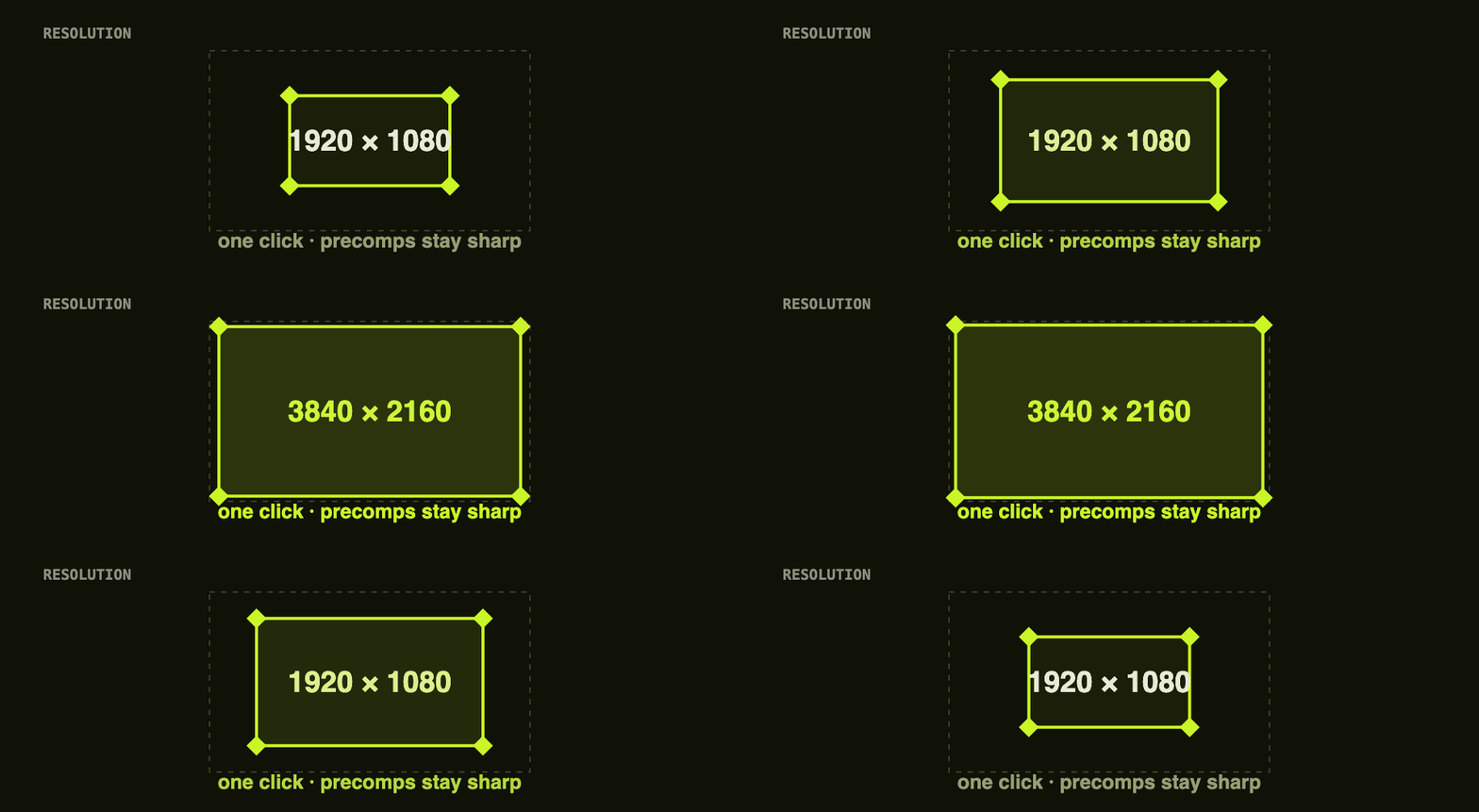
  • تغییر وضوح: وضوح کامپوزیشن را با یک کلیک تغییر دهید. از پیش‌تنظیم‌های Full HD، 2K و 4K استفاده کنید یا اندازهٔ دلخواه را بر اساس طولانی‌ترین ضلع تعیین کنید. گزینهٔ Continuously Rasterize نیز به‌طور خودکار برای حفظ وضوح لایه‌های پیش‌کامپوزیشن فعال می‌شود.

resolution

روش کار

  1. یک لایهٔ پیش‌کامپوزیشن را انتخاب کنید؛ یا برای کار روی کل کامپوزیشن باز، چیزی انتخاب نکنید.
  2. مدت‌زمان، ضریب سرعت یا پیش‌تنظیم وضوح موردنظر را تعیین کنید.
  3. با یک کلیک، تغییر را روی کل درخت کامپوزیشن اعمال کنید. با یک بار Undo می‌توانید همه‌چیز را به وضعیت قبل برگردانید.

مواردی که Retend تغییر نمی‌دهد

  • لایهٔ Time Remapping اضافه نمی‌کند.
  • نرخ فریم را تغییر نمی‌دهد.
  • والدگذاری یا ترتیب لایه‌ها را عوض نمی‌کند.
  • افکت‌ها یا اکسپرشن‌ها را بازنویسی نمی‌کند.

به این پست چه امتیازی می دهید؟

0 / 5. 0

GraphicFarm.ir
  • sell کد محصول: 36700
  • folder_zipفرمت: RAR
  • saveحجم: 1 MB
  • linkمنبع

Retime or extend entire nested precomp tree — in one click.

Description

One click, whole tree
After Effects
macOS & Windows
No Time Remapping

The problem
Not one comp.The whole tree.

You need a precomp three seconds longer, or the whole sequence at double speed. Until now that meant opening every nested comp by hand, dragging out-points one at a time, retiming keyframes property by property — or reaching for Time Remapping and quietly wrecking the frame rate for whoever opens the project next.
Retend replaces all of that. Select a precomp layer — or select nothing, to work on the whole open comp — type a target duration or speed, and click. The entire nested tree, however many comps deep, changes together, correctly, in one action.

By hand
Open every nested comp, one at a time
Drag each out-point and hope you caught them all
Retime keyframes property by property
Or add Time Remapping and lose the frame rate
Undo it in a dozen separate steps

With Retend
Select the precomp — or nothing at all
Type the duration or the speed you want
Click once; the whole tree follows
Frame rate untouched, no Time Remap layer
One undo puts everything back

What it does
Four operations,every one recursive.

Extend
Lengthens a precomp's entire tree without touching a single keyframe. Every nested comp grows by the same amount, at every depth.

A layer already reaching the old end — even one dragged past it — is pushed out to the new end.
A layer deliberately trimmed short is left exactly where it was. Footage that runs out freezes on its last frame.

Retime
Proportionally rescales an entire nested tree, faster or slower. Every keyframe, marker and layer timing scales together, eases preserved.

Frame rate never changes, and no Time Remap layer is ever added.
Works either direction — speed it up, or slow it down.

Real footage handling
Video and audio have no keyframes to rescale, so it's a choice — one that only comes up when a precomp actually contains footage.

Change speed — stretch it, so the same content plays faster or slower.
Keep native speed — shrinking trims the tail, growing loops the visible range (Cycle or Ping-pong).

Resolution rescale
Rescales a comp's resolution in one click — Full HD, 2K, 4K presets, or a custom target by longest side.

Precomp layers stay sharp — Continuously Rasterize is enabled automatically.

How it works
Three steps, one undo.

01
Point at the tree
Select a precomp layer, or select nothing at all to work on the whole open comp.

02
Set a target
Type a duration, a speed multiplier, or pick a resolution preset.

03
Click once
The whole tree changes together. If it isn't what you wanted, one undo puts everything back.

What it deliberately doesn't do
Retend changes timing and resolution. It leaves everything else about how the comp is built exactly as you made it.

No Time Remapping layer, ever
No frame-rate changes
No re-parenting or layer reordering
No effects or expressions rewritten

footagefarm.ir

ارسال دیدگاه

keyboard_arrow_up

ورود به حساب کاربری

بازیابی رمز عبور

یکی از روش‌های زیر را برای بازیابی رمز عبور انتخاب کنید