close
close
StockMusic.ir
  • اسکریپت مدیریت آسان پنجره‌های افترافکت

  • AEscripts - Neat Freak v1.1

  • circle شرکت سازنده: AEscripts
  • circle کد محصول: 42826
  • circle نرم‌افزار سازگار: After Effects
  • circle نسخه نرم‌افزار: 2027, 2026, 2025, 2024, 2023, 2022, 2021, 2020, CC 2019, CC 2018, CC 2017, CC 2015.3, CC 2015, CC 2014, CC, CS6 و بالاتر
  • circle فرمت فایل: ZIP

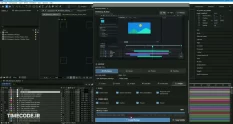
اگر از به‌هم‌ریختگی محیط کاربری در افترافکت خسته شده‌اید و زمان زیادی را برای مرتب‌سازی پنل‌ها هدر می‌دهید، این ابزار کارآمد دقیقاً همان چیزی است که به آن نیاز دارید. با این اسکریپت قدرتمند می‌توانید ظاهر و تنظیمات رابط کاربری را در کل پروژه به‌صورت یکپارچه مدیریت کنید و نظم حرفه‌ای را به محیط کاری خود بیاورید. این محصول برای طراحانی که با تمپلیت‌های آماده یا پروژه‌های اشتراکی کار می‌کنند، یک نجات‌دهنده واقعی است.

ویژگی‌ها

  • تنظیم ستون‌های تایم‌لاین: نمایش ستون‌های مختلف تایم‌لاین را در سراسر پروژه کنترل کنید و ستون‌های غیرضروری مانند Comments، Keys، In و Out را پنهان کنید.
  • بستن ویژگی‌های باز لایه‌ها: تمام ویژگی‌های بازشدهٔ لایه‌ها را در تایم‌لاین جمع کنید.
  • کوچک‌نمایی تایم‌لاین: نمایش تایم‌لاین را طوری تنظیم کنید که کل کامپوزیشن دیده شود.
  • تنظیم دکمه‌های کامپوزیشن: وضعیت Draft 3D، Shy و دکمه‌های دیگر را کنترل کنید. هر دکمه فقط وقتی فعال می‌شود که دست‌کم یک لایهٔ مرتبط با آن ویژگی در کامپوزیشن وجود داشته باشد.
  • بازنشانی پنل نمایشگر: تنظیمات Viewer را به حالت پیش‌فرض برگردانید؛ از جمله خاموش‌کردن خط‌کش‌ها و خطوط Title Safe و قراردادن کامپوزیشن در مرکز پنل.
  • تنظیم چیدمان نماها: تعداد نماهای قابل‌مشاهده در پنل Viewer را مشخص کنید.

نکات مهم

  • نحوهٔ اعمال تغییرات: Neat Freak پروژه را به‌صورت فایل XML ذخیره می‌کند و تغییرات را به‌صورت آفلاین روی آن اعمال می‌کند.
  • تهیهٔ نسخهٔ پشتیبان: پیش از اجرای اسکریپت، حتماً از پروژه نسخهٔ پشتیبان تهیه کنید.
  • بدون امکان Undo: پس از اجرای فرایند، امکان بازگرداندن تغییرات با Undo وجود ندارد.

به این پست چه امتیازی می دهید؟

0 / 5. 0

GraphicFarm.ir
  • sell کد محصول: 42826
  • folder_zipفرمت: RAR
  • saveحجم: 1 MB
  • linkمنبع

Set After Effects UI elements project-wide. Great for sharing projects or Template authors!

What is it?
Neat Freak is a utility tool for After Effects to set UI (timeline columns, zoom, buttons, viewer and similar) elements to your liking project wide. Useful when working with collaborative, templates or any other 3rd party projects.
Have too many opened timeline columns and cannot even see layers? Or maybe viewer layout is all messed up an out of place? Then give Neat Freak a go!

Neat Freak is not a tool that should be used regularly, but it might find a place in your toolkit when working with template projects or collaborating other designers. Neat Freak let’s you set Timeline Columns project wide and wipe out columns that you don’t need that take up unnecessary screen space (such as Comments, Keys, In, Out etc). It also helps when working on small screens, as you can set what should be visible in the interface. Another cool feature is that it can reset Viewport to default and turn off rulers, title safe grid, reposition composition to the center of viewport and such. There are some other small features, that you’ll have to find yourself.
I do hope that this is something you find useful.

Features

Set Timeline Columns controls visibility of timeline columns.
Twirl-up Layer Properties closes all opened layer properties in timeline.
Zoom-out Timeline zooms out to entire composition.
Set Timeline Buttons controls the state of Draft 3D, Shy and other composition buttons. Button will be enabled only if composition contains at least one layer that matches property.
Reset Viewer to Defaults sets default viewer configuration.
Set Viewport Layout controls number of viewports visible in the viewer.

Notes

Neat Freak saves current project as XML file and modifies it offline. It is highly recommended to back up your project before running the script.
There is no Undo step for the process.

footagefarm.ir

ارسال دیدگاه

keyboard_arrow_up

ورود به حساب کاربری

بازیابی رمز عبور

یکی از روش‌های زیر را برای بازیابی رمز عبور انتخاب کنید